Announcements
Available to: branch_manager, country_manager, global_manager, organization
The Announcements module lets managers broadcast messages to their staff. The scope of each announcement is limited by your role — branch managers can only target their branch, while global managers and organisation admins can reach the entire organisation.
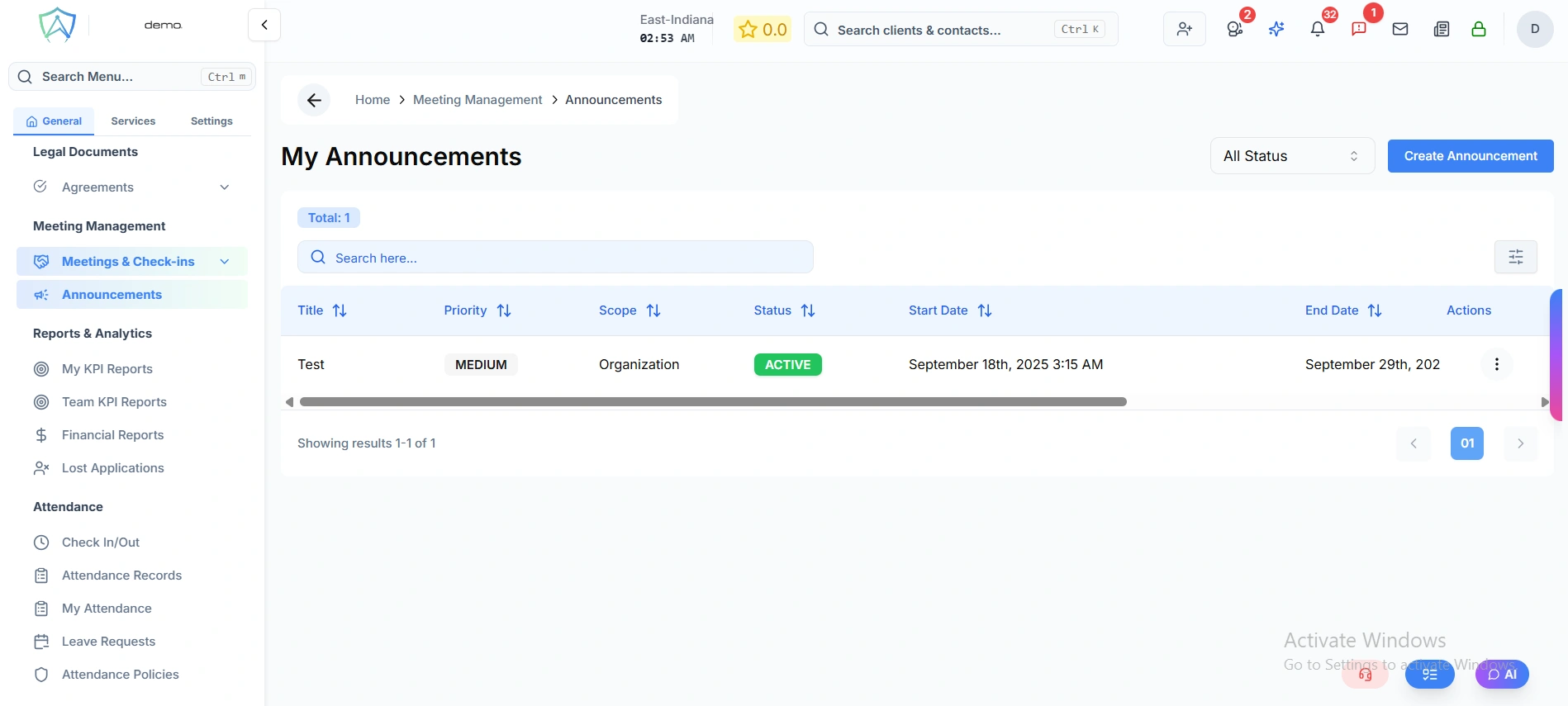
My Announcements
The announcements list shows only the announcements you have created. Use the status filter in the top-right corner to narrow the view:
| Filter | Description |
|---|---|
| All Status | Show all announcements regardless of status |
| Active | Currently visible to staff |
| Draft | Created but not yet live |
| Expired | Past their end date |
The total count of your announcements is shown as a badge above the table.
Announcements Table
| Column | Description |
|---|---|
| Title | Name of the announcement |
| Priority | URGENT / HIGH / MEDIUM / LOW — colour coded |
| Scope | Organisation Wide, Country, or Branch |
| Status | ACTIVE / DRAFT / EXPIRED — colour coded |
| Start Date | When the announcement becomes visible |
| End Date | When the announcement stops showing |
| Creator | Staff member who created it |
| Last Updated | Date and time of the last change |
Click a row to view the full announcement including any comments. The Edit and Delete actions are available in each row.
Creating an Announcement
Click Create Announcement to open the form. The form is divided into three sections:
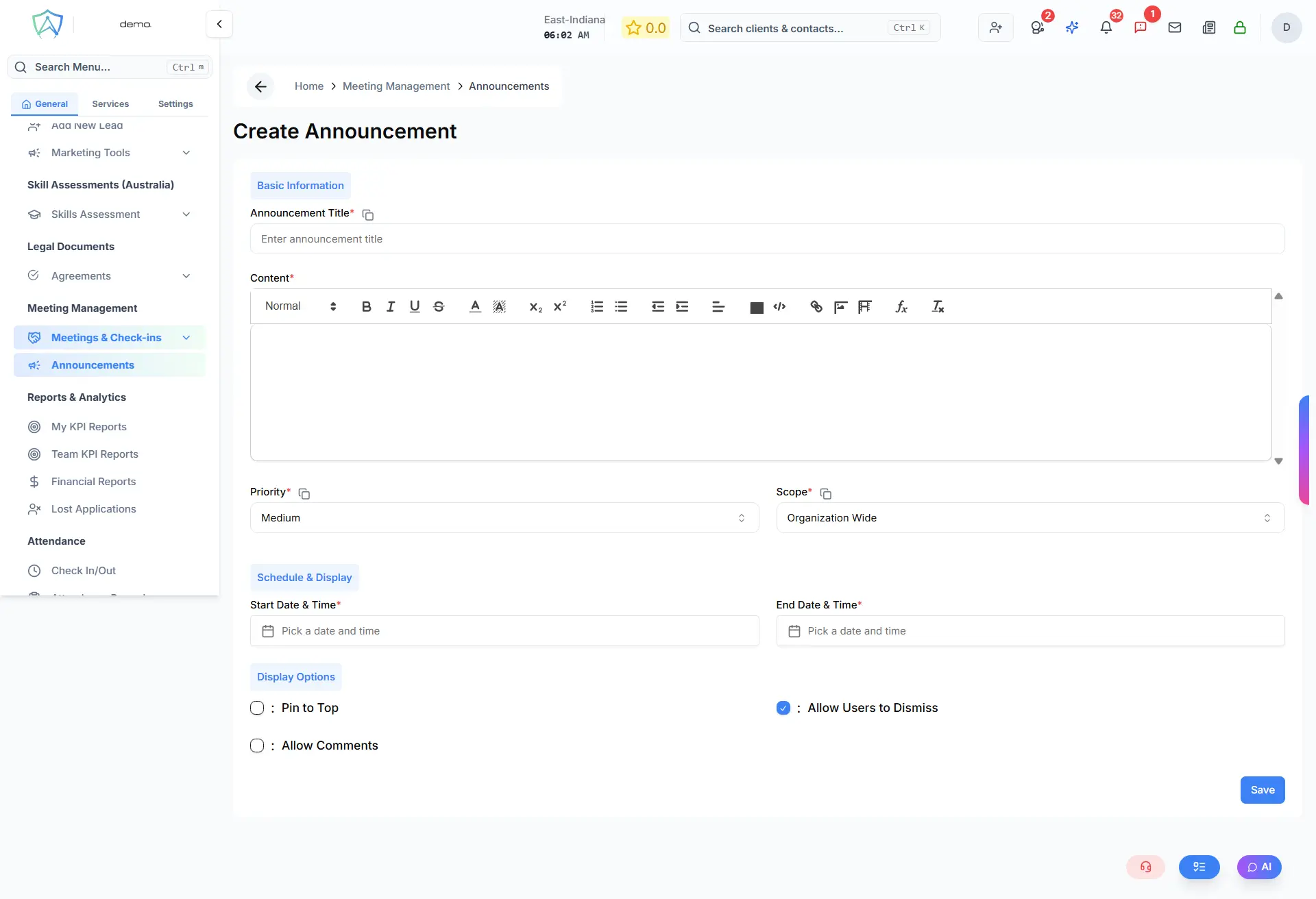
Basic Information
| Field | Required | Description |
|---|---|---|
| Announcement Title | Yes | Max 200 characters |
| Content | Yes | Rich text editor — supports formatting |
| Priority | Yes | Low / Medium / High / Urgent |
| Scope | Yes | Determines who sees the announcement (see below) |
| Country | Conditional | Required when Scope = Country Level |
| Branch | Conditional | Required when Scope = Branch Level |
Scope options depend on your role:
| Role | Available Scopes |
|---|---|
| Branch Manager | Branch Level only |
| Country Manager | Country Level, Branch Level |
| Global Manager / Organisation | Organisation Wide, Country Level, Branch Level |
Schedule & Display
| Field | Required | Description |
|---|---|---|
| Start Date & Time | Yes | When the announcement becomes visible to staff |
| End Date & Time | Yes | When the announcement automatically stops showing |
Display Options
| Option | Description |
|---|---|
| Pin to Top | Keeps the announcement pinned at the top of the announcements widget |
| Allow Users to Dismiss | Users can close and hide the announcement for themselves |
| Allow Comments | Staff can leave comments and replies on the announcement |
Click Create Announcement (or Update Announcement when editing) to save.
Comments
When Allow Comments is enabled, staff can comment on an announcement. Comments support threaded replies and are visible to all users who can see the announcement.
Where Announcements Appear
Active announcements are displayed in the Announcements widget on the Dashboard for all users within the announcement's scope. Sticky announcements appear pinned at the top of the widget. Dismissible announcements can be hidden by individual users.