Financial Reports
Required Role
ACCOUNT permission required — Global roles only
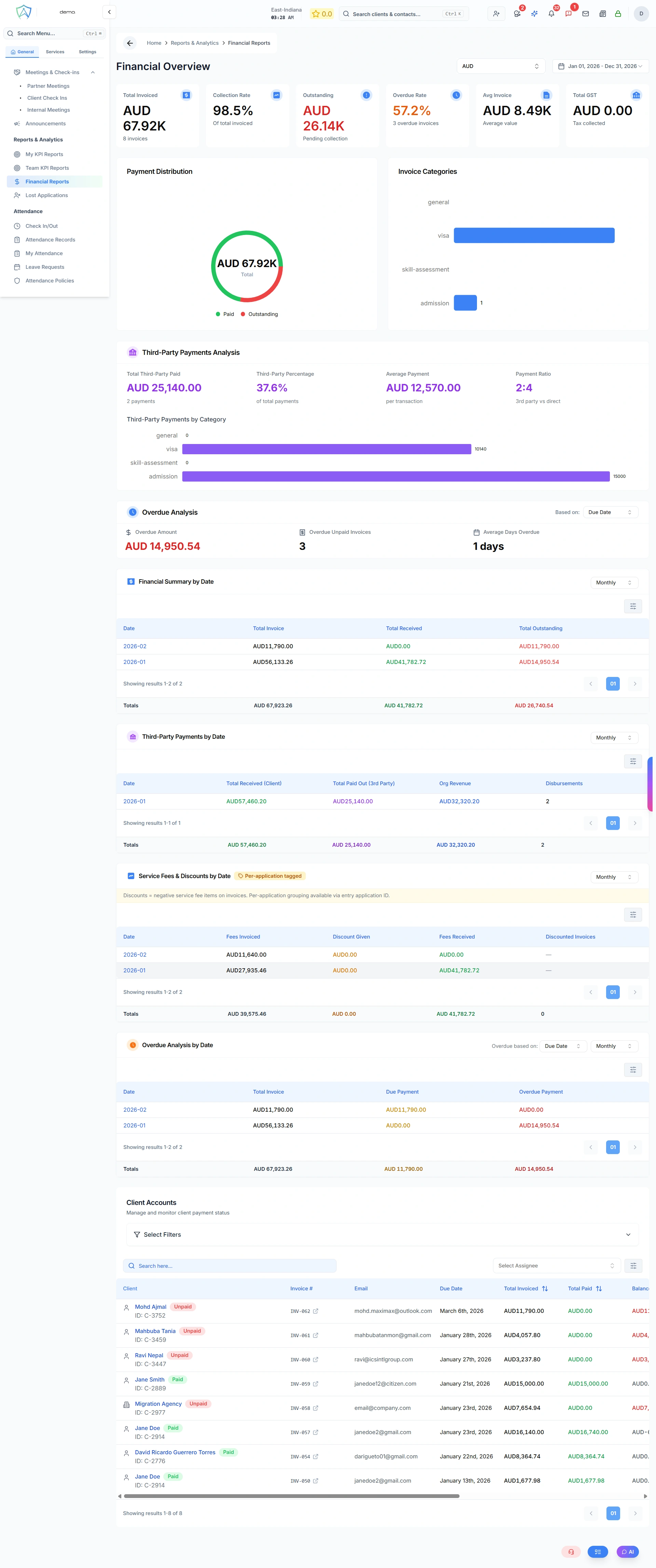
The Financial Reports page provides an overview of your organisation's financial performance, including invoice summaries, outstanding payments, and revenue trends.
Invoice Summary
The primary view is a summary of all invoices raised by the organisation:
| Column | Description |
|---|---|
| Invoice Number | Unique invoice reference |
| Client | The billed client |
| Service | What the invoice is for |
| Amount | Total invoice value |
| Issued Date | When the invoice was raised |
| Due Date | Payment due date |
| Status | Paid / Unpaid / Partial / Overdue |
Financial Summary Cards
At the top of the page you'll see:
- Total Revenue (This Month) — all paid invoices this month
- Outstanding — total unpaid invoice amount
- Overdue — invoices past their due date
- Average Invoice Value — mean invoice amount
Revenue Charts
- Monthly Revenue Trend — bar chart of revenue over the past 12 months
- Revenue by Service Type — breakdown of income by visa, admission, skill assessment, etc.
- Revenue by Branch — (global roles) breakdown by office
Filtering
Filter the financial report by:
- Date range
- Branch
- Service type
- Invoice status
- Assigned agent
Exporting
Export the filtered data as CSV or PDF for accountancy purposes or to import into your accounting software (e.g. Xero, MYOB).