Add Client
CLIENT_MANAGEMENT permission required
Use the Add Client form to create a new client profile in Agent Manager. A client record is required before you can create any applications, agreements, or invoices for that person.
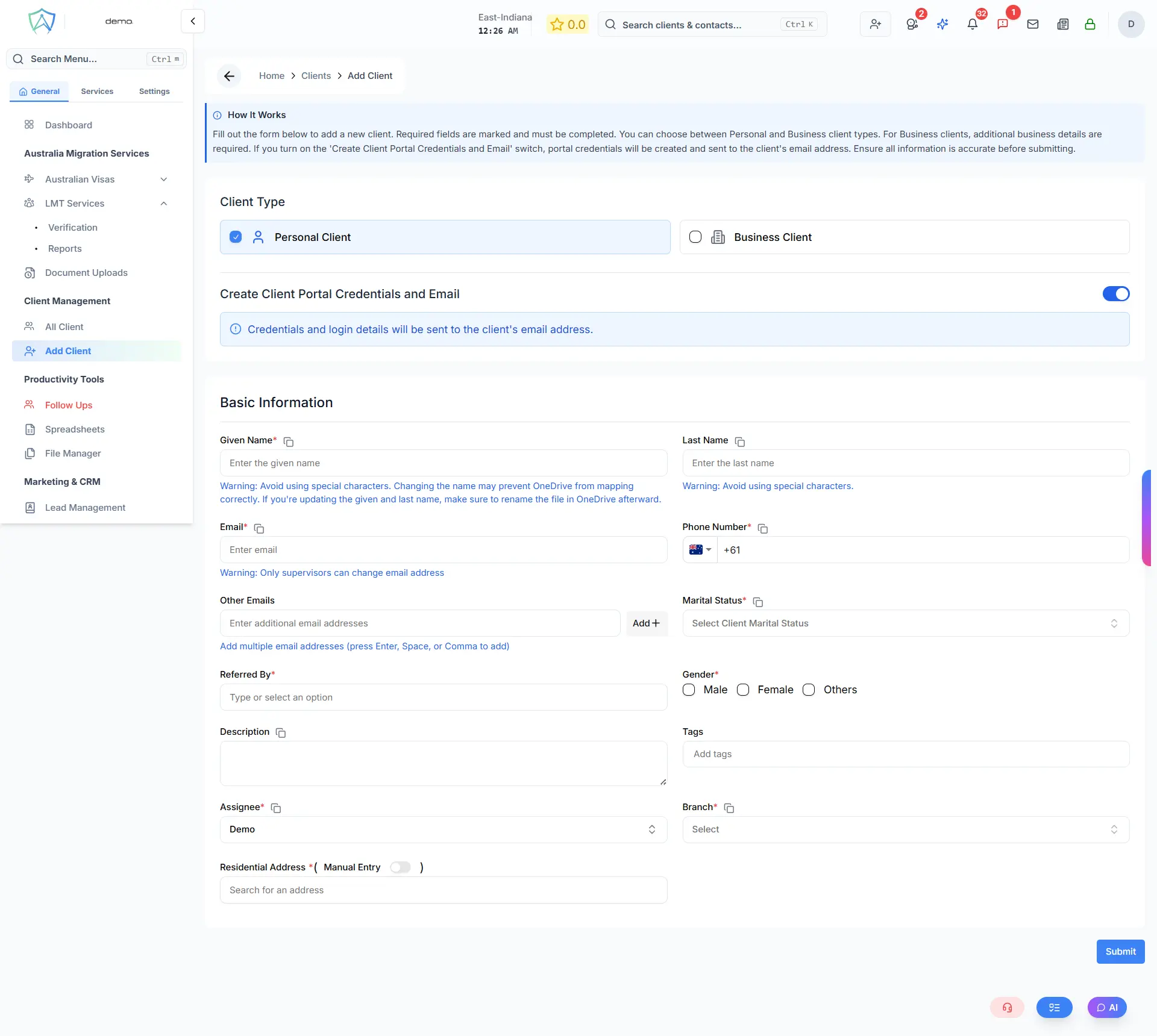
Step 1 — Select Client Type
Choose the type of client before filling in the form:
| Type | Description |
|---|---|
| Personal Client | An individual person |
| Business Client | A company or organisation |
When converting a Family Member to a client, the type is locked to Personal Client and the form is pre-filled with the family member's details.
Step 2 — Client Portal Credentials
Use the Create Client Portal Credentials and Email toggle to control whether login credentials are automatically generated and emailed to the client on creation.
| Toggle | Behaviour |
|---|---|
| On (default) | Portal credentials are created and sent to the client's email address |
| Off | No credentials are created — the client will not have portal access |
Step 3 — Fill in the Form
Personal Client Fields
| Field | Required | Description |
|---|---|---|
| First Name | ✅ | Client's first name |
| Last Name | ✅ | Client's last name |
| Middle Name | — | Optional middle name |
| ✅ | Used for portal login and automated emails | |
| Phone | ✅ | Primary contact number |
| Gender | — | Client's gender |
| Address | ✅ | Current residential address (Google Maps autocomplete) |
| Referral Source | — | How the client was referred (e.g. Website, Walk-in) |
| Notes / Description | — | Internal notes about the client |
| Tags | — | Add one or more tags to categorise the client |
| Assignee | ✅ | Case officer responsible for this client — defaults to logged-in user |
| Branch | ✅ | Office branch — defaults to current user's branch |
Business Client Fields
All personal client fields apply, plus:
| Field | Required | Description |
|---|---|---|
| Business Name | ✅ | Registered business name |
| Trading Name | — | Trading or DBA name |
| ABN | — | Australian Business Number |
| Website | — | Business website URL |
| Business Contact Person(s) | — | One or more contact persons for the business |
Saving the Client
Click Submit to create the record. On success the system will:
- Create the client profile in the database
- Create a base client folder in Google Drive
- Assign folder permissions to the case officer
- Send portal credentials to the client's email (if toggle is on)
- Redirect you to the new client's profile summary page
When converting a family member, the button label changes to Convert to Client and the form is pre-filled with the family member's details.
Duplicate Check
If a client with the same email already exists, the system will return a conflict error and block creation. Resolve the conflict before resubmitting.