New University Admission Application
Required Role
SERVICE_SUPPORT permission required
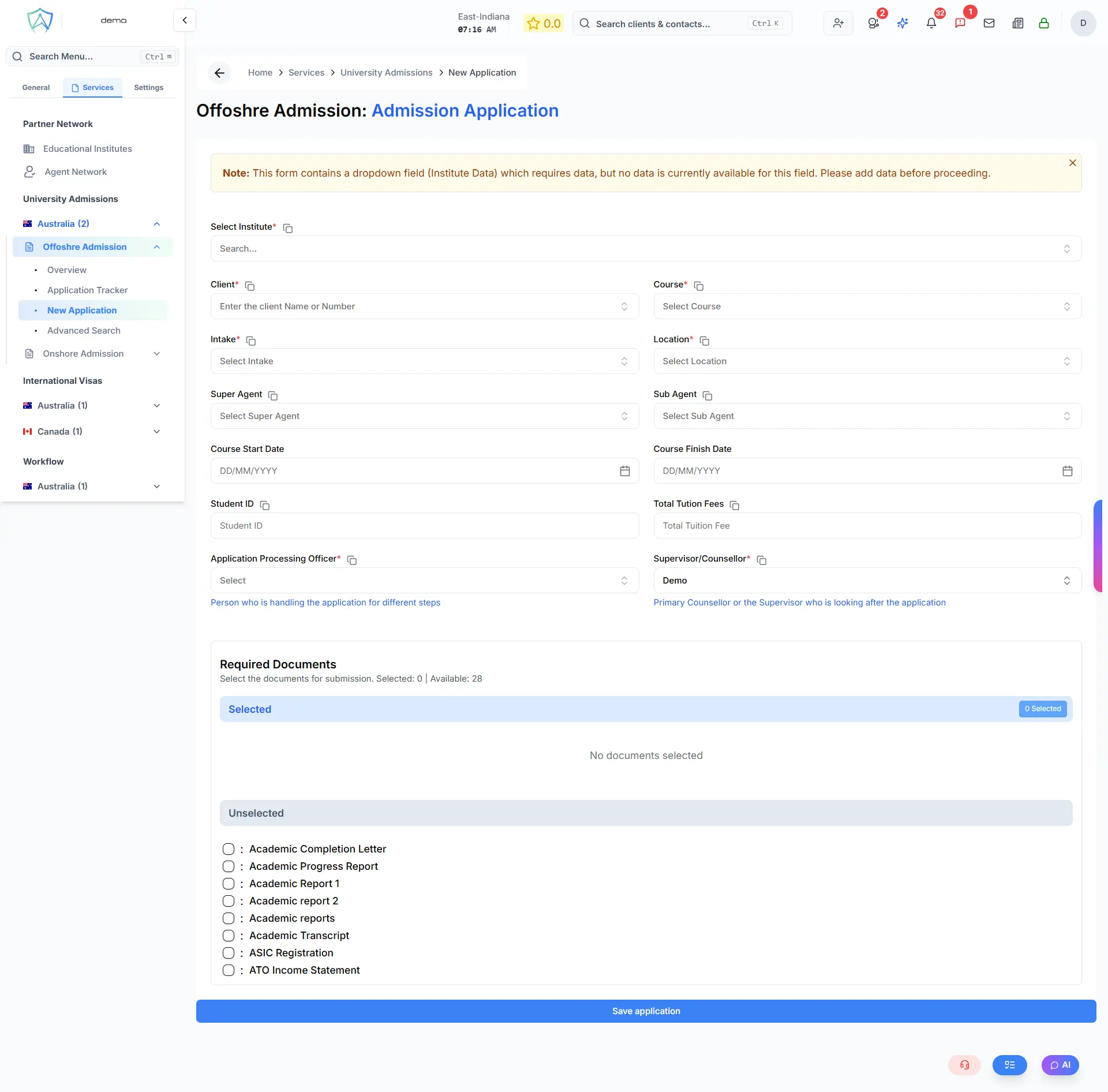
Use this form to create a new university admission application for a client.
Step 1 — Select Client
Search for or create the client profile.
Step 2 — Course Selection
- Institution — pre-selected based on the service you're in
- Course / Program — search and select the course
- Campus — select the campus location if multiple exist
- Intake Period — select the semester or intake the client is applying for
- Study Mode — On-campus / Online / Hybrid
Step 3 — Academic Background
Enter the client's:
- Highest qualification (name, institution, country, graduation year, GPA)
- English language test results (IELTS, TOEFL, PTE, etc.)
- Any prerequisite subjects or requirements
Step 4 — Document Checklist
Auto-generated based on the institution and course. Typical documents:
- Academic transcripts and certificates
- English test results
- Personal statement / Statement of Purpose
- Letters of recommendation
- Resume / CV
- Passport copy
Step 5 — Application Details
- Assigned agent
- Priority
- Internal notes
Step 6 — Save
Click Create Application. The application appears in the tracker with status Draft.